A loyalty program for your Shopify store
Thrice runs a loyalty program inside your Shopify store: customers earn points on orders and on actions you choose, and spend them on discount codes. You set it up yourself from the Shopify admin, without a developer.
Tell me when it's liveFree up to 200 member orders a month. No sales call.
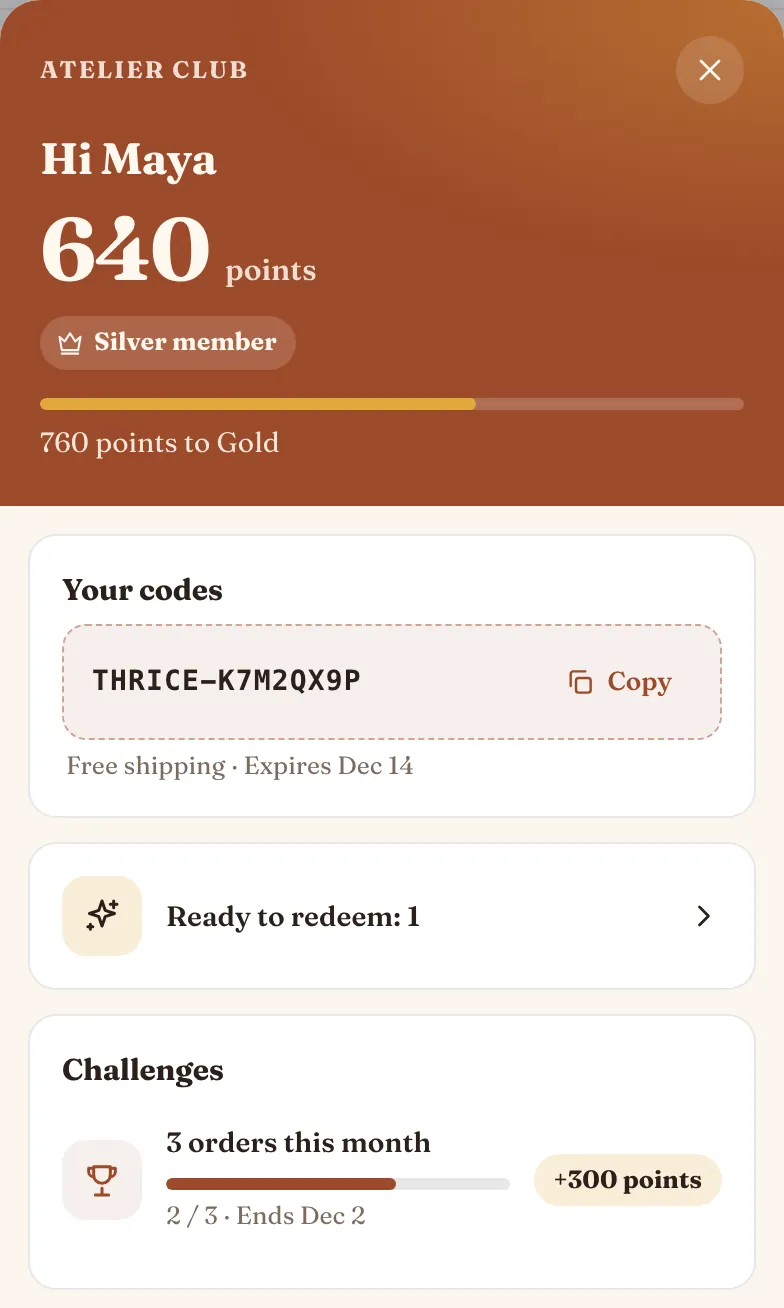
What your customers see
A rewards button sits on the pages of your store and opens a panel. Members see their points balance, their VIP tier and how far they are from the next one, the rewards they can redeem, the ways to earn and their referral link.
You can also add a full loyalty page to your theme, and a line on product pages that says how many points the product earns. Visitors who are not members see the ways to earn and the rewards, with a Join now button.
Who becomes a member
By default every customer joins automatically: when their Shopify customer record is created or updated, or when they place a paid order. You can switch to members who press Join instead, and keep groups such as wholesale customers out with customer tags.
Only members earn points, and orders without a Shopify customer earn nothing.
Setting up the loyalty program
The setup wizard offers three starting points, Starter, Engagement and VIP, and lists every way to earn, reward, tier and challenge with its values before it creates them. Each is built so rewards give back about 5% of what a customer spends, and you can change everything afterwards.
Under Store design you pick one of five presets, then set the seven colors, the font, the corners and the launcher button with a live preview. Buttons on the same page open Shopify's theme editor where you switch the widget and the loyalty page on.
Moving from another loyalty app
Upload a CSV of members with their point balances, birthdays, join dates and referral codes. Thrice recognizes the column names loyalty apps commonly use in their customer exports, and a check shows the problem rows before anything is saved.
Imported points are added to each balance, VIP tiers are worked out from them, and customers get no emails from the import. An import can be undone, and uploading the same file again does not add the same points twice.
Questions
Do I need a developer to add a loyalty program to Shopify?
No. The rewards widget is a Shopify app embed and the loyalty page is an app block, so you switch them on in the theme editor like any other app. Store design has buttons that open the editor at the right place.
Do customers who ordered before I installed Thrice get points?
Not on their own. Import past orders gives points for paid orders from the last 7, 30 or 60 days, under the same rules as new orders, and sends customers no emails. For anything older, import point balances from a CSV.
Do customers need an account to collect points?
Yes. Points belong to a Shopify customer, so orders without one earn nothing. Signed-out visitors see the ways to earn and the rewards with Join now and Sign in buttons, which take them to your store's account pages and back to the page they were on.